Key takeaways
- In the Beav knowledge base, click + next to Knowledge Base, choose Add link and paste the exact link to a Zhihu question, answer or column. Zhihu links are read through the capture service, which requires sign-in or a configured capture API and consumes quota according to its rules. Account profile links aren't supported.
- If you're already in a chat, send the exact link and say "save to the knowledge base". The AI reads and files it, and can read the public comments when you ask, so you can see what readers are still questioning or pushing back on. Reading a single specified link doesn't bring up a credit confirmation.
- What's worth saving are the long answers you'll come back to months later. Each one is an entry with its source link that you can file into your own folders and drag into a chat for the AI to cite when you write.
Some of the most useful things on Zhihu are long, top-voted answers where someone explains an industry, an experience or a judgment call in real depth. You hit Favorite and tell yourself it'll come in handy when you write about this. Three months later you have hundreds of favorites, all titled as questions, and you can't find it. When you do, the author may have edited the answer or deleted it.
Saving an answer solves "don't lose it." This piece is about collecting those long answers as reference material: saving them by their exact links into a reference library on your computer, sorting them by topic, and months later pulling them out so the AI can cite the original text while you write. The extra points and follow-up questions in the comments can be read in a chat too.
Who it is for
- Creators covering knowledge, careers or industry analysis who often turn to Zhihu for arguments and examples.
- Writers and editors who research before a long piece and want a reference library of high-quality answers.
- Content operators who want to know what readers are still asking or arguing about on a topic.
How to use it
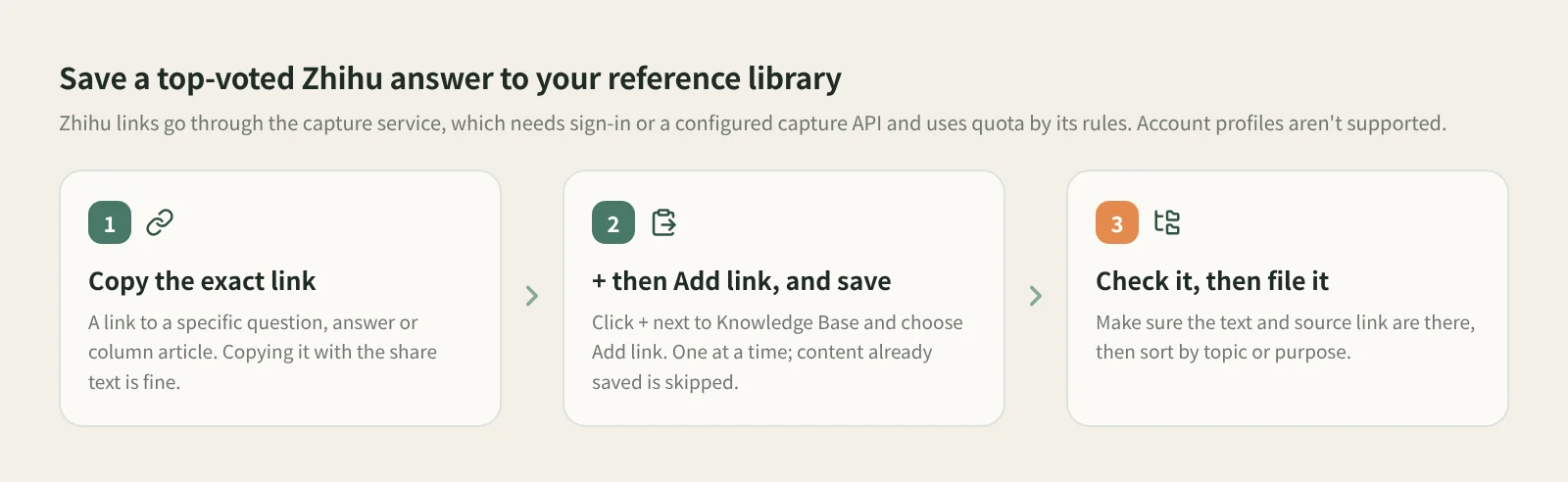
- Copy the exact link. Open the answer on Zhihu and copy its link. It has to point to a specific question, answer or column article; account profile links can't be saved. Copying it with the share text is fine; Beav finds the link.
- Click + and choose Add link, then save. At the root of the knowledge base or in a personal folder, click the + in the title bar or next to Knowledge Base on the left, choose Add link, paste and click Save or press Enter. Beav resolves short links, identifies the platform and saves to the root of the current space's knowledge base. Links are saved one at a time; on success the dialog shows the detected platform and clears the input so you can paste the next.
- Check what was saved. Go back to the knowledge base and confirm the title, text and source link are there. Content already in the knowledge base isn't saved again. If saving fails, the dialog keeps the link and the reason so you can fix it and try again.
- File it into folders. New answers land at the root. Create folders by topic or purpose, say "industry calls", "first-hand cases" or "counterarguments", and move answers in regularly. Months later, finding one by topic beats scrolling back through Favorites.
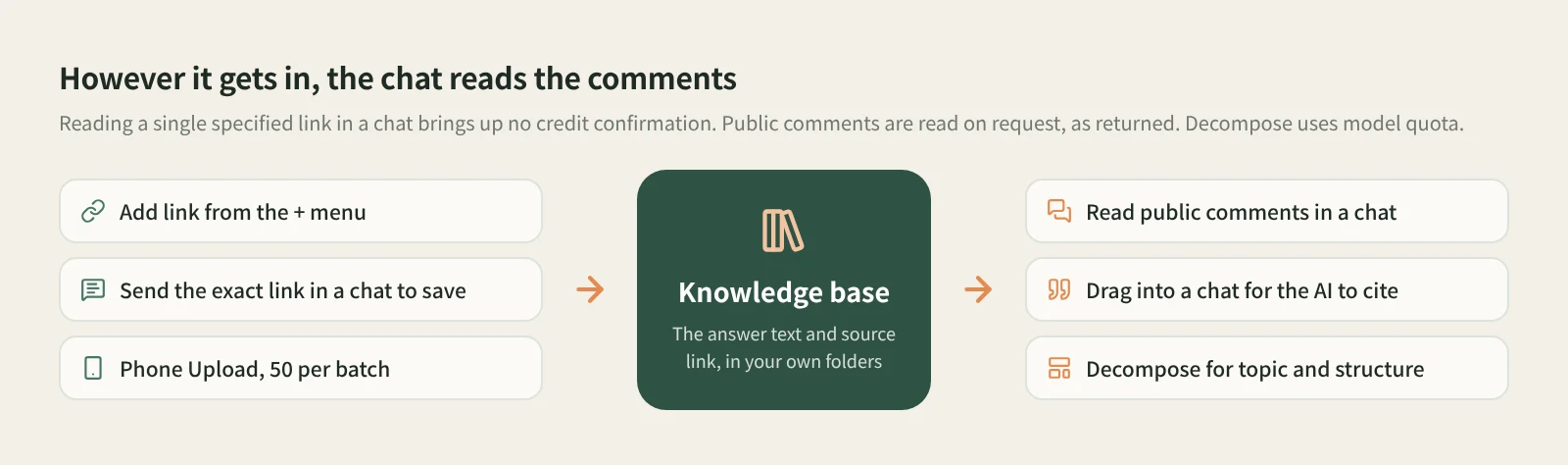
Save it from a chat and read the comments while you're there. If you're discussing topics with the AI, send the exact link to a Zhihu question, answer or column and say "save to the knowledge base". The AI reads and files it, and a Zhihu reading card appears in the chat that opens a preview of what was saved. If you want the comments, just ask: "Read the public comments too and tell me what people are asking and pushing back on." Reading a single specified link doesn't bring up a credit confirmation. More on this in saving links from a chat.
Follow-up questions in the comments are leads for your next piece. Under a top answer you'll often see "What about small companies?" or "Does this still hold today?" The questions the author never answered are often the angle you can write. After reading the comments, jot the ones worth pursuing into the Topic pool on the home page; press Enter and it's saved. Comments are read in the chat, and how many come back depends on what's actually returned, which may be fewer than the page shows.
Other ways in. For answers you find on your phone, click Phone Upload in the desktop knowledge base, pair by scanning with your phone on the same Wi-Fi, and paste links on the collection page, up to 50 per batch, with Beav running on the computer. See moving things between phone and computer. If you're reading Zhihu in a desktop browser, the Beav browser extension can also save the current page.
Let the AI cite the original when you write. In a chat, open the knowledge base in the right workspace and drag the answers you want onto the input box. Be specific: "Using the examples in these two answers, outline a piece on my topic and note which answer each argument comes from." The AI reads the text you saved, not a vague memory that "someone on Zhihu said so."
Want to see how an answer is built? Click Decompose on the entry yourself. Answers and columns mainly produce a topic, a structure and a template, using model quota. Shots and clips only appear if the answer includes a video that's been saved locally. For the full flow from decomposing to rewriting, see saving, breaking down and rewriting Zhihu answers.
How it compares with the usual ways
| Zhihu Favorites | Evernote, Notion and other clippers | Copying into your own notes | Saving to your Beav library | |
|---|---|---|---|---|
| Strength | One tap while reading, smoothest on the phone, and you see the author's latest edits | Mature reading and highlighting, cross-device sync | Take exactly the passages you want, most flexible | Answers sit with material from other platforms and go straight to the AI when you write |
| Where it lives | Your Zhihu account | Each service's cloud | Your notes app | The Beav knowledge base on your computer |
| After the answer is deleted | Usually gone | Clipped text is usually still there | What you copied is still there | The saved text and source link remain |
| Comments | Go back to the post | Usually only the body is clipped | Copy them yourself | Read public comments on request in a chat |
| Handing it to AI | Copy it out first | Export or copy first | Paste it again | Drag it into a chat to cite |
| Cost | Free | Per each service's membership | Free, but slow | Capture service quota by its rules |
Zhihu Favorites is the most convenient while you're scrolling on your phone, and you see the author's later additions and edits as soon as they happen. Clipping tools are more mature than Beav for reading, highlighting and syncing across devices. If you only want a few great lines, copying them into your own notes is the most direct. Beav is for collecting long answers as writing material over time: in the same library as your Official Account articles and RedNote posts, sorted your way, and ready to hand to the AI when you write.
Limits and notes
- Use an exact link. Only links to a specific question, answer or column can be saved; account profiles and unsupported URLs are reported immediately.
- Add link uses the capture service. It requires sign-in or a configured capture API and consumes quota according to its rules. It saves one link at a time and isn't a bulk import, and it isn't shown in shared spaces, account profiles, subscription views or local source folders.
- Comments are read in a chat. Public comments are read on request in a chat, and the amount depends on what's actually returned.
- Your library lives on your computer. Beav has no backup or restore feature yet, so plan for that before you switch machines. Saving never starts a decomposition either.
- Saved answers are for your own reference and research. Credit the author when you cite their views, and ask before republishing or quoting at length. Beav never posts for you.
Next steps
- To break a saved answer down and rewrite it as your own, read saving, breaking down and rewriting Zhihu answers.
- For more on saving from a chat, read how to save a link without opening a browser. For why collecting matters at all, read the series overview, "Accumulation Is the Moat".
- Full reference: add a link to save a single post, have AI read and save in a chat and upload note links from your phone.
Applies to Beav desktop 2.9 and later.