Key takeaways
- In the Beav knowledge base, click + next to Knowledge Base, choose Add link and paste the link to a single X post. X links are read through the capture service, which requires sign-in or a configured capture API and consumes quota according to its rules. Account profile links aren't supported.
- On the local library page in Beav 2.9, X posts show as cards with the author, text, media and an engagement row. The card holds the data from when you saved the post; it doesn't refresh.
- For posts you find on your phone, pair by scanning and submit them on the phone page. X (Twitter) is on the supported list, up to 50 links per batch. Your saved overseas posts sit next to your Chinese material, ready to drag into a chat for the AI to cite.
Plenty of Chinese creators check X every day for voices from outside: how people in an industry see a new product, what researchers in a field are arguing about, how far an idea has traveled in English. When something's good, they bookmark it. Then when it's time to write a piece in Chinese, the bookmark is buried or the post is gone. The screenshot is still there, but with no link, and no way to tell how many people liked or reposted it at the time.
Saving an X post means keeping more than one sentence. Who wrote it, what exactly they said, what image came with it, and how it was doing at the time are all things you'll need when you cite it later. This piece is about collecting good X posts into a reference library for writing in Chinese: saving single posts by their links into a knowledge base on your computer, sorting them by topic, and having the AI cite the text you saved when you write, instead of a vague "someone overseas said."
Who it is for
- Creators who look to X for overseas viewpoints and industry news, then make content for Chinese platforms.
- Writers covering tech, AI, going global or investing who need to show where a view came from.
- Anyone who wants English and Chinese references in one library they can search and hand to an AI.
How to use it
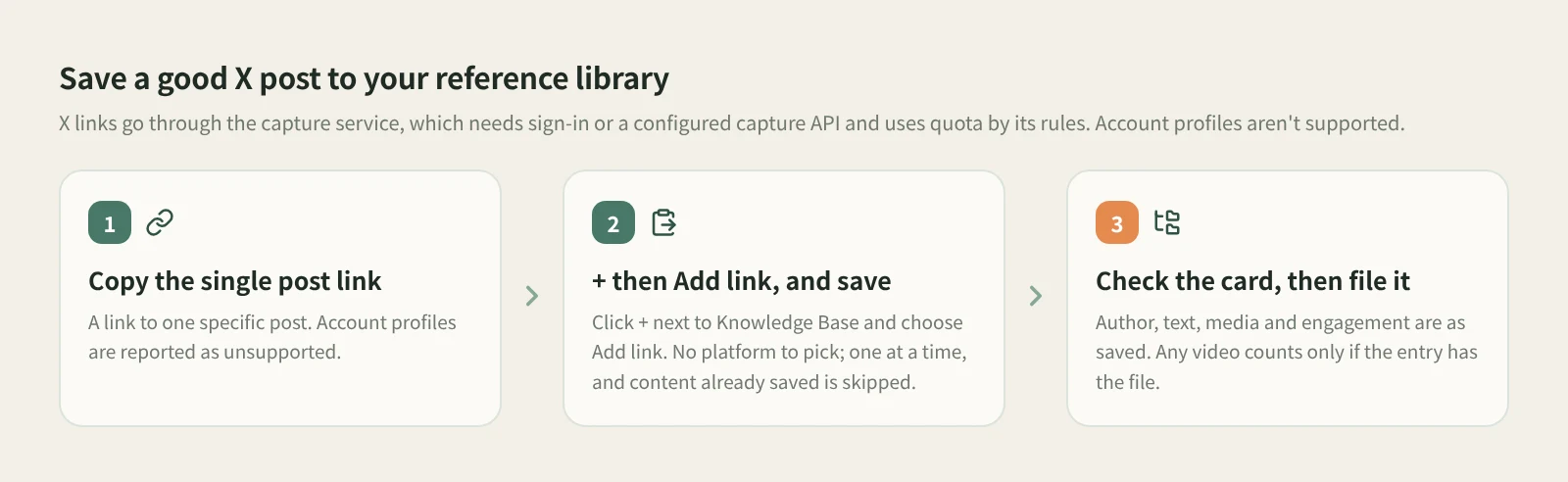
- Copy the single post link. Open the post on X and copy its link. It has to point to one specific post; an account profile link is reported as unsupported.
- Click + and choose Add link, then save. At the root of the knowledge base or in a personal folder, click the + in the title bar or next to Knowledge Base on the left, choose Add link, paste and click Save or press Enter. You don't pick a platform: Beav resolves short links, recognizes X and saves to the root of the current space's knowledge base. Links go in one at a time, and on success the input clears for the next one.
- Check what was saved. Back in the knowledge base, make sure the text, author and source link are there. With Beav running, open the local library page at
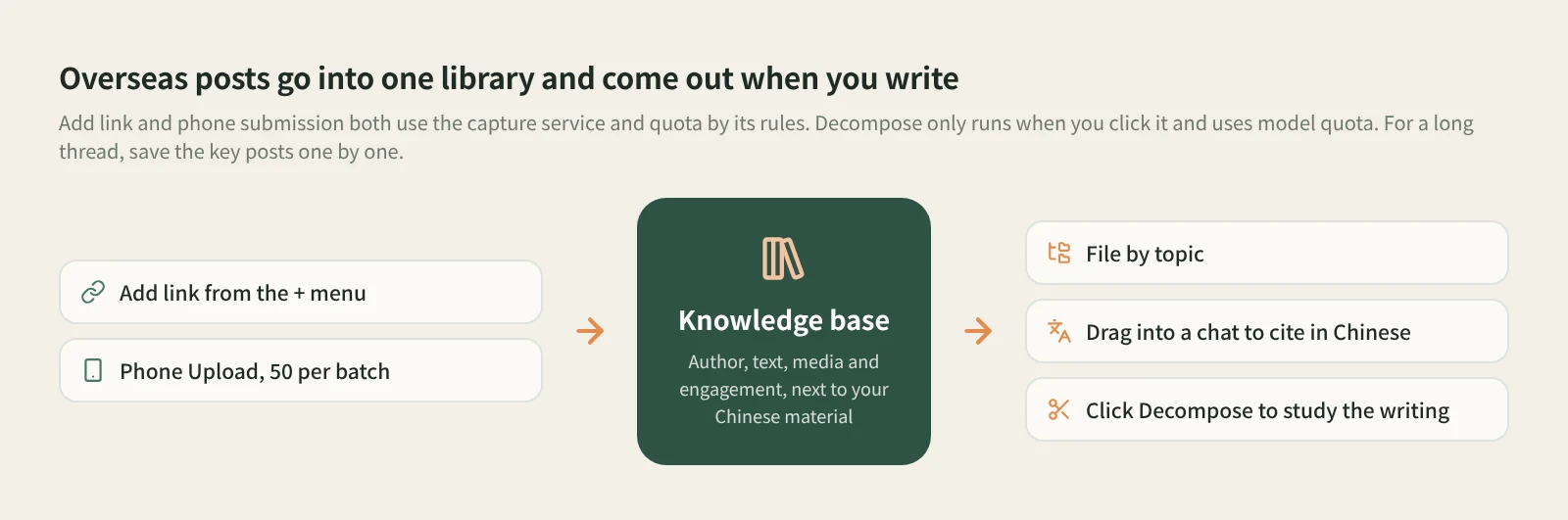
127.0.0.1:31937/libraryin a browser, and X posts show as cards with the author, text, media and an engagement row. The card shows the data from the moment you saved it, doesn't follow the platform afterwards, and leaves out engagement counts that are missing. A video in the post won't necessarily be saved locally; go by whether the entry actually has a video file. Content you've already saved isn't saved twice, and if saving fails the dialog keeps the link and the reason so you can fix it and try again. - File it into folders. New posts land at the root. Make folders by topic or purpose, say "AI product takes", "going global cases" or "the other side". Finding things later beats scrolling through Bookmarks.
What about long threads? Some ideas on X come as a chain of posts. The Beav docs don't describe saving a whole thread in one go, so my suggestion is to pick the posts that matter, save each one by its own link, and put them in the same folder so they still read in order later.
Other ways in. For posts you find on your phone, click Phone Upload in the desktop knowledge base, pair by scanning with your phone on the same Wi-Fi, and paste links on the collection page, up to 50 per batch. X (Twitter) is on the supported list, and Beav has to be running on the computer. See moving things between phone and computer.
Let the AI cite the original when you write in Chinese. In a chat, open the knowledge base in the right workspace, drag in the X posts you want to draw on, and be specific: "Using these four posts, summarize in Chinese the main views practitioners overseas have on this product, mark which author said each one, and keep the original quotes in English." The AI cites the posts in your own library, so every point traces back to an author and a link. Translation and summary can drift, so check the key lines against the original.
Want to see why a post got reposted so much? Click Decompose on the entry yourself. It mainly produces a topic, a structure and a template, using model quota; see saving, breaking down and rewriting X posts.
What uses quota? Both Add link and phone submission read X links through the capture service, using quota by its rules. Citing and summarizing in a chat afterwards uses the chat model.
How it compares with the usual ways
| X Bookmarks | Screenshots | Read-later and download tools | Saving to your Beav library | |
|---|---|---|---|---|
| Strength | One tap while scrolling, synced across devices | No setup, and it captures the post as it looked | Read-later apps are great for reading and highlighting; downloaders hand you the media file | Overseas posts sit with your Chinese material and go to the AI when you write |
| Where it lives | Your X account | Your photos or a folder | Each tool's library or download folder | The Beav knowledge base on your computer |
| After the post is deleted | Usually won't open | The image stays, without link or text | Depends on the tool | The saved text and source link remain |
| Author and engagement | Live numbers on the original post | Whatever fit in the shot | Depends on the tool | The card shows author, text, media and engagement as saved |
| Handing it to AI | Copy it out first | Pull the text out of the image first | Export or tidy it first | Drag it into a chat to cite |
| Cost | Free | Free | Per each tool's terms | Capture service quota by its rules |
X Bookmarks is the smoothest option on any device, and going back to the original shows you the latest numbers. Screenshots are right when you need a record. Read-later apps are mature at reading, highlighting and review, and if all you want is the video file, a downloader is more direct. Beav is for collecting overseas viewpoints as writing material over time: in the same library as your RedNote, Zhihu and Official Account material, sorted your way, and ready for the AI to cite when you write in Chinese.
Limits and notes
- Use a single post link. Only links to one specific post can be saved; account profiles and unsupported URLs are reported immediately. It takes one link at a time rather than a bulk import, and you won't find it in shared spaces, account profiles, subscription views or local source folders.
- Sign in or set up a capture API first. X links run on the capture service, and quota is used according to its rules.
- The data is from when you saved it. The card isn't a live feed; for the latest likes and reposts, go back to the post.
- Videos aren't guaranteed to be saved locally. Go by whether the entry has a video file.
- Your material lives on your own computer. Beav has no backup or restore feature yet, so decide for yourself whether to keep a copy elsewhere. Saved posts aren't decomposed automatically either.
- Saved posts are for your own reference and research. Credit the author and source when you cite, and ask before translating and republishing. Beav never posts for you.
Next steps
- To break down a saved post and rewrite it as your own, read saving, breaking down and rewriting X posts.
- For why collecting matters at all, read the series overview, "Accumulation Is the Moat". For getting posts from your phone to your computer, read moving things between phone and computer.
- Full reference: add a link to save a single post and upload note links from your phone.
Applies to Beav desktop 2.9 and later.