Key takeaways
- A decomposed reference video gives you shots, a per-shot shooting script and a timed transcript, and
decompositions/<title>in the asset library holds the Markdown, keyframes, shot MP4 clips and M4A audio cues. That's the groundwork for your shot list.- In a chat, drag the decomposed video and your own product material from the right workspace onto the input box. Say which platform, audience and key selling point, and ask for a shot list that keeps the reference's rhythm and order with your content in it.
- Save the result as a draft, with the shot structure and what's still to shoot or generate. Beav helps you write the list; you do the shooting and editing. You're borrowing the rhythm, not copying the frames.
After decomposing a viral video, a lot of people stare at the shot-by-shot script for a while and then don't know what to do with it. The script is about someone else's product in someone else's setting. Shoot it as written and you've made a remake. Don't, and you wonder why you broke it down at all.
What a decomposition really leaves you is a rhythm: what the first few seconds show, which shot raises the problem, how many shots it takes to cover the features, how the ending circles back. Keep that rhythm, swap in your product and your setting, and you have a list you can shoot from tomorrow. Saving and breaking down are how you build a material library. Using it in your own work is where it pays off.
Who it is for
- Creators shooting product, local-shop or how-to videos who want to follow a proven rhythm with their own content.
- People who have decomposed a few reference videos but still start every script from a blank page.
- Content leads and small teams who need to hand a clear shot list to whoever is filming or on camera.
How to use it
First make sure the reference video has been decomposed: once the video is saved locally, open it and click Decompose, which uses model quota. How that works is covered in breaking down a viral short video.
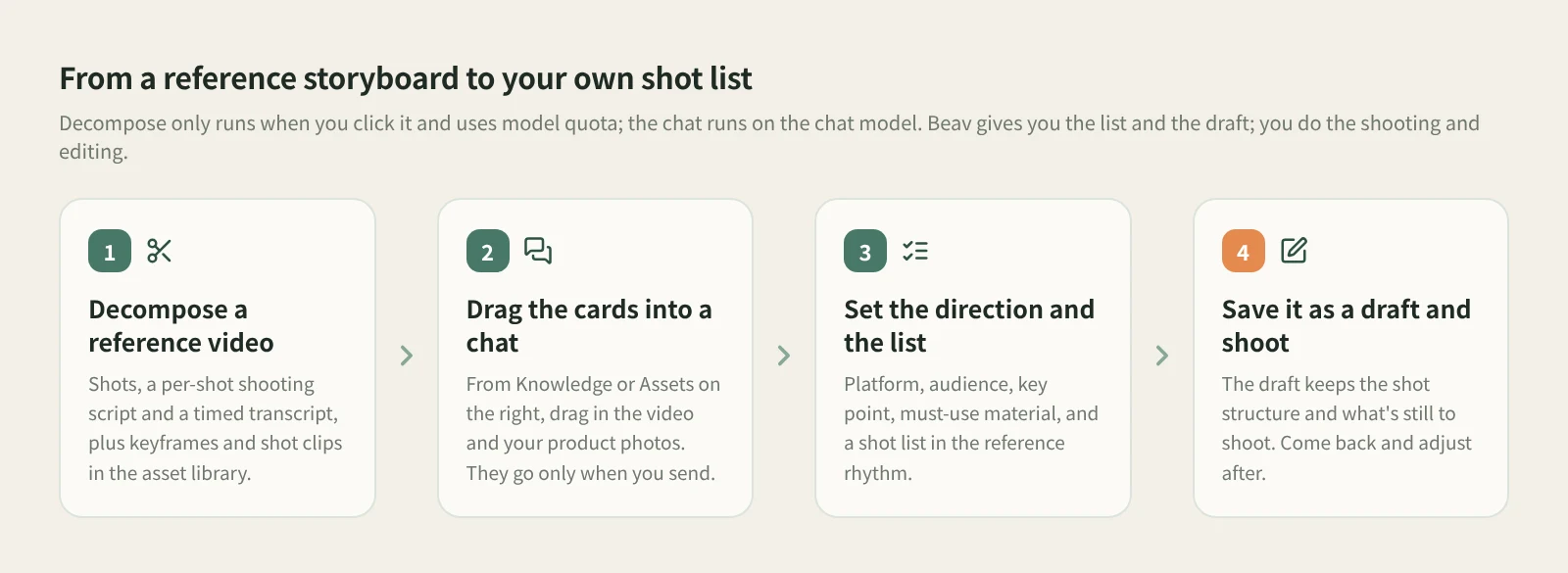
- Go through the decomposition first. Expand the result and read the shots and the per-shot shooting script. Click a shot thumbnail or timestamp to jump to that point in the video. If a cut is off, merge a shot into the previous one or split at the playback position; new clips are only generated after you decompose again.
- Drag the cards into a chat. Start a new chat. With the input box focused, press
⌘K(Ctrl+Kon Windows / Linux) to open the right sidebar. Drag the decomposed reference video from Knowledge and your own product photos or footage from Assets onto the input box. A reference card with a type label appears above the input, and it goes along only when you send. - Set the direction. Tell Beav the platform, target audience, key selling point, material you must use and the structure you want, and ask for a shot list explicitly. For example:
Keep this video's shot rhythm and order: what each shot does and roughly how long it runs.
Swap the content for my product (an insulated commuter bottle) and my setting
(a small rented flat and an office on a weekday morning), aimed at people in their
first job, vertical video for Douyin.
Give me a shot list. For each shot: shot size, duration, action, line or caption, props.
Don't copy the original's footage or lines, and don't treat its numbers as facts about my product.- Check it, then refine. The AI gives you a first list. Hold it against the reference's shot script to see whether the rhythm lines up, then follow up: "shot three is too long, split it into two close shots", "open with the clip I already have".
- Save it as a draft. Once the list is settled, save it as a draft rather than leaving it as a chat reply. The draft keeps the paragraph, shot or voiceover structure and the covers, illustrations, video or audio still to generate. After filming, come back to it for reshoots and tweaks.
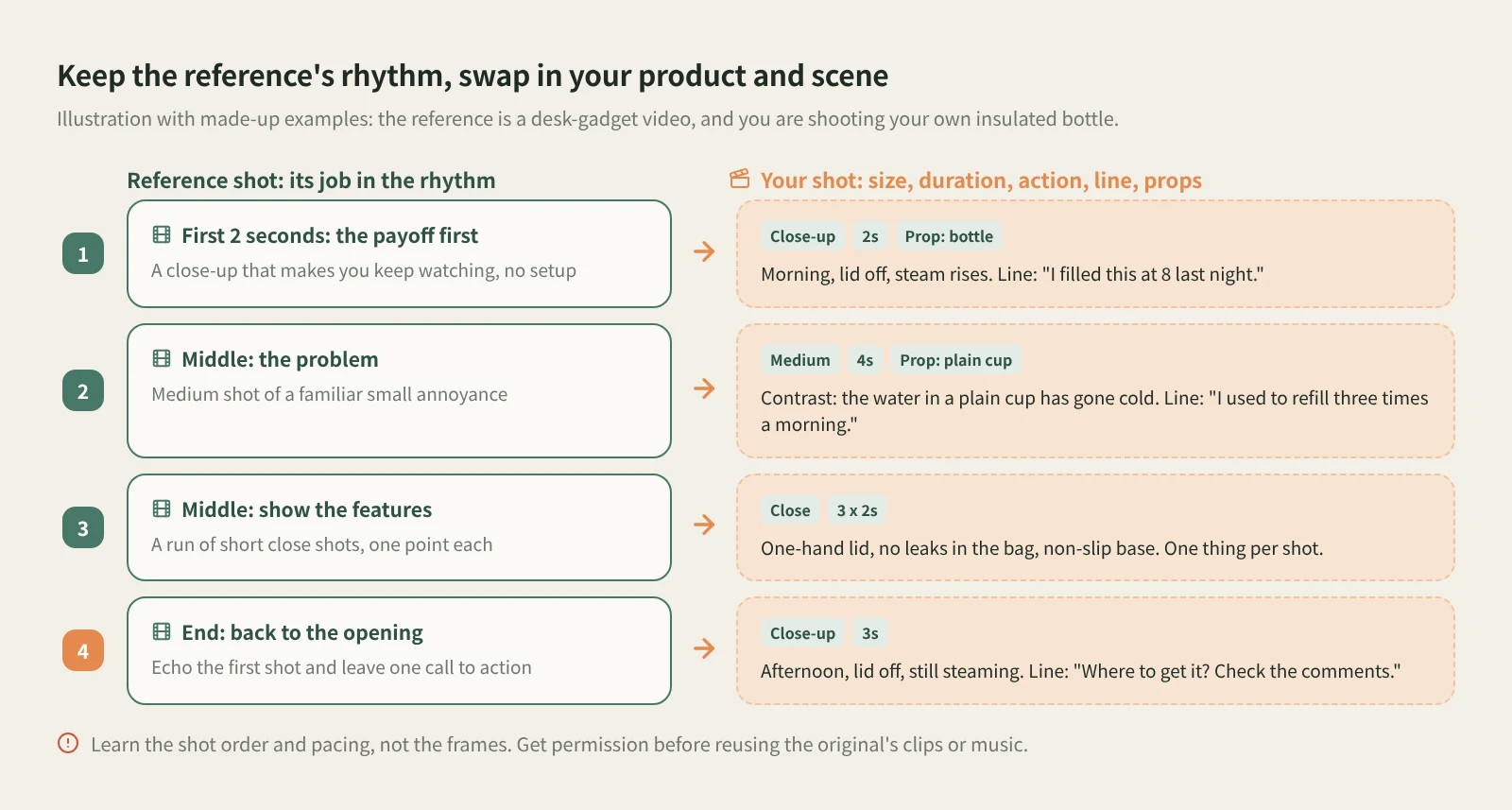
What to keep, what to change. Keep each shot's job and length: payoff first, then the problem, one feature per shot, an ending that echoes the opening. Change the product, people, setting and lines, and change them as a set. A new product means new props, new lines and new captions. It's the same idea as rewriting image posts, explained in AI rewriting that isn't just swapping words.
What about the transcript and the music? The timed transcript shows which line lands on which shot, which helps you size your own lines. The M4A audio cues come from stretches of the original with no speech, may include ambient sound, and aren't separated music. Check the rights before using one. The safer route is to take its mood and beat as a guide and pick your own track. For a closer look at all four outputs on a Douyin video, see breaking down a Douyin video.
How it compares with the usual ways
| Pausing the original frame by frame and taking notes | A general AI script tool | Beav: drag the decomposed shots into a chat | |
|---|---|---|---|
| Strength | The closest look and the truest feel for the pacing | Always at hand, quick to turn an idea into a draft script | The reference's shots and script sit in the same library as your material |
| Where the reference comes from | What you watch and write down | Whatever you describe or paste in | A decomposed video in your knowledge base, brought in as a reference card |
| Matching the rhythm | Yes, but you line up every shot yourself | Usually generic patterns, not tied to one reference | Shot by shot, following the reference's order and each shot's job |
| Where the result lives | A notebook or document | Usually in that one chat | Saved as a draft, next to the reference and your material |
| Cost | Free, but slow | Per each provider's terms | Decompose uses model quota; the chat runs on the chat model |
Pausing frame by frame takes the longest, but nothing beats it for feeling the pacing, and watching the original yourself before you shoot is still worth it. If you don't have a specific reference and just want a rough script fast, a general AI script tool is handy. Beav suits people who already have references saved: the decomposed videos, your material and the finished drafts sit in one library, ready for the next video too.
Limits and notes
- Beav doesn't shoot or edit for you. It gives you a shot list and a draft. Filming, editing and publishing are yours.
- Shots and clips need the video saved locally. An item decomposed from text only has no shots to follow.
- The shot script and your list are model-generated. Check them against the original and the place you'll actually film, and change any shot you can't get on the day.
- Borrow the rhythm, not the frames. The original's clips, keyframes and music are someone else's work. Get permission before putting them in your video.
- The original's numbers aren't your facts. Results, figures and comparisons from the reference video don't carry over to your product.
Next steps
- Decompose your reference first: breaking down a viral short video and breaking down a Douyin video.
- For why it's worth building up references over time, read the series overview, "Accumulation Is the Moat".
- Full reference: set the direction, save it as a draft and give the AI material.
Applies to Beav desktop 2.9 and later.