
Workflow overview
From capture to draft
Develop topics from real sources and create editable posts, video scripts, or voiceover scripts.
Content templates (2.10.4 beta)
Checked on 2026-11-02 for desktop 2.10.4. Create is available in release builds as a beta. Choose New template, enter a link or select an item from References; the reference context menu also offers Make a template. References without a decomposition need one first, with model usage confirmed before starting. Review what to keep, what you must supply and what will not be copied. Confirm the template, then fill in your topic and materials to start a conversation.
The template context menu supports editing, renaming, duplication and deletion. The per-run adjustment field changes only this output. Explicitly ask to save changes into the template for future use, then review it again. Vlog templates can produce a shooting outline before footage is available and a rough cut afterwards. Templates belong to the current space; shared spaces are not supported. Report a problem and Template help are available in the header. Templates prepared by the team are not automatically delivered back to Create yet.
Decomposition distinguishes reusable form, replaceable content and creator-specific details. It adds page analysis, common patterns across references, a video-hook library and shot tags. Existing results need another decomposition or a supplemental pass for new fields. These instructions were checked against the built-in guide and source; model quality, template similarity and each finished output still need review.
Gather sources on one topic
Start by saving a few related items in the same workspace: high-performing notes, comment sections, product material, earlier drafts, and user feedback. Keep the source, tags, and the reason you saved each one.
Decompose videos and notes
Reviewed on 2026-10-13, updated 2026-10-27 (decomposition is now manual only). This page applies to Beav desktop 2.9.0 and later. Real model, extension, phone, and next-day recovery behavior still needs validation in those scenarios.
Open a note or video in a local knowledge library and click Decompose (拆解). For a batch, select items, open the context menu, and confirm the item count, video duration, and model usage. A batch accepts up to 100 items and skips queued, running, or completed items. Use the detail panel to decompose a completed item again. Shared spaces do not offer these actions. A YouTube video can be decomposed after you confirm the paid resolution in the desktop app and the download finishes.
Decomposition only runs when you start it. Versions with the 2026-10-27 change removed the Decompose after saving (保存后拆解) checkbox from the extension, Enter link, and the phone URL collection page, as well as the per-creator Automatically decompose new content switch and its daily allowance. Saving, subscription syncs, and phone uploads never start a decomposition. Automatic requests queued before the upgrade that had not started are not run; their card shows that the breakdown stopped and can be started manually.
Expand the result to see a topic, structure/template, shots, a per-shot shooting script, and a timed transcript. The topic is also saved to the topic center. Local video is required for shot and audio extraction; text and image posts mainly produce topics, structures, and templates. Click a shot thumbnail or timestamp to seek. Merge a shot into the previous one or split at the playback position; subsequent decomposition keeps the edited cuts.
Copies go to decompositions/<title> in the asset library (items decomposed earlier keep 拆解/<title>): Markdown, keyframes, shot MP4 clips, and M4A audio cues. Audio cues are audible non-speech ranges and may contain ambient sound; this is not vocal separation. Changed outputs are saved as new copies without overwriting your asset edits. After adjusting cuts, decompose again to generate new clips; old clips remain. The origin panel retains the source, author, and time range. Confirm reuse rights before publishing or commercial use.
Incomplete results or waiting work
Check the reasons at the bottom of the result, media download progress, and model configuration. Transcription, topic/structure analysis, and shooting scripts require their respective transcription, chat, and video-understanding capabilities and consume model usage. Completed portions remain available if another step fails. Oversized video is compressed to a low-resolution copy; if it still exceeds the limit, the shooting script is skipped with a reason.
An asset-copy failure does not delete the original decomposition result. Read the error before deciding whether to run it again. Switching spaces cannot redirect transcript writes to an item with the same ID in the new space. After an application interruption, open the original space's knowledge library to resume pending work; real interruption and next-day recovery checks remain pending.
Start from saved content
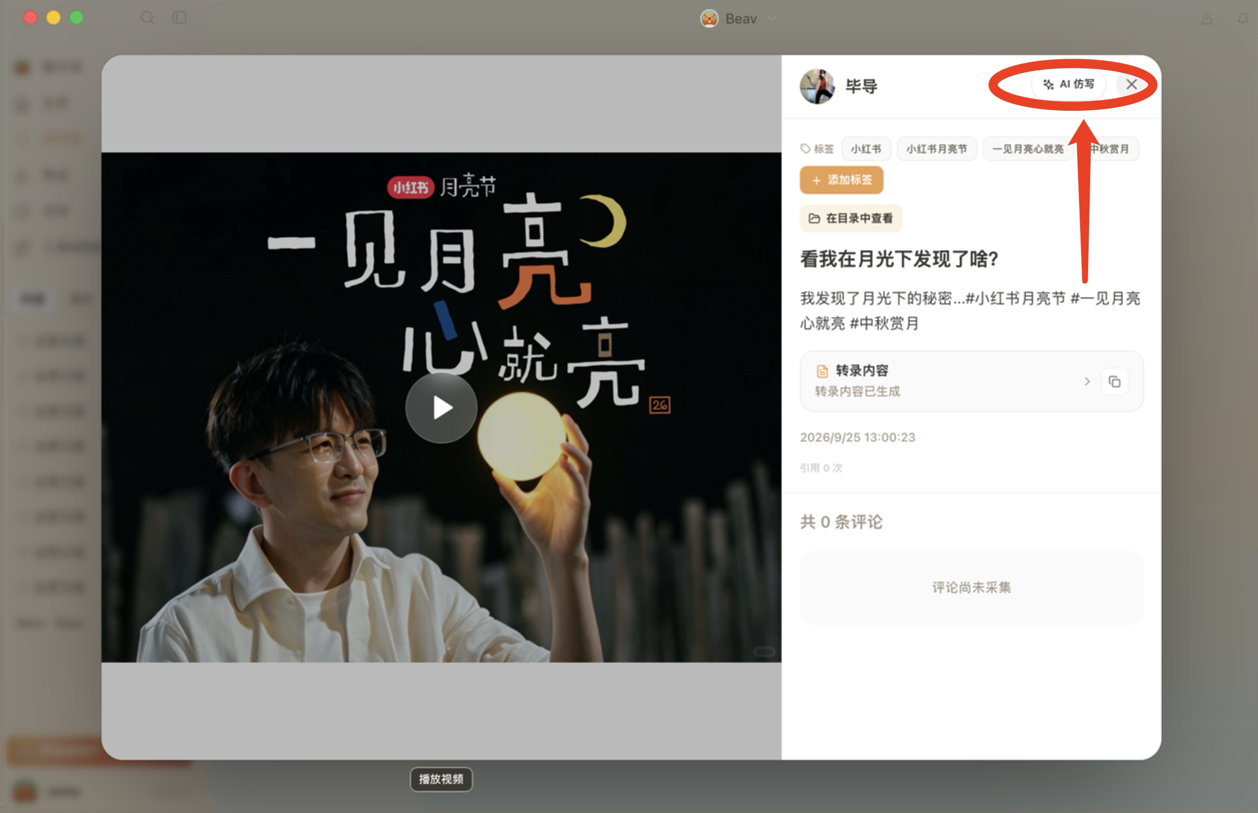
Open an item in the knowledge library and click AI rewrite in the top-right corner. The updated desktop opens a new conversation with a prefilled prompt, a reference to the current item, and the rewriting skill selected. Add your audience, format, or rewriting requirements, then review and send manually. Clicking the button does not send a message automatically.
Applies to desktop source containing the 2026-10-05 draft update; real desktop click verification is pending.
Keep the relationships that make the reference work
State what to keep, what to change, and whether the deliverable should be text, images, or video. For example: “Keep the four-panel single page, characters, and reading order; only change French to Spanish.” The assistant should explain the structure it actually observed before proposing the adaptation. A source labeled “video” does not automatically make the requested deliverable a voiceover script. Plans normally come first; an existing instruction to produce the work or continue an approved plan remains valid.
The updated guidance considers label-to-object relationships, simultaneous comparisons, actions between comic panels, and visual changes tied to speech. Changing a language, character, or product can affect labels, dialogue, imagery, and sound. Data or demonstrated effects from the reference are not evidence about the new product; missing evidence needs to be supplied or checked.
The confirmed format carries into image and video production. Requests such as “change only page two” or “replace the voice but keep the visual relationships” should reuse unaffected accepted assets and check the revised result. If pages or media cannot be read, the assistant should identify the observed scope. Titles, OCR, and a written plan cannot establish unseen visual relationships or replace an agreed media deliverable.
Applies to Beav desktop 2.8.14. Synthetic scenarios have been reviewed; real model production, saving, and media quality still need validation in an updated session. See media prerequisites for reference frames and speech timing.
Let Beav find the topics
Ask a specific analysis question, for example:
Based on the comments and similar high-performing posts I saved recently,
find the three topics most worth making. For each one give the target audience,
the core pain point, the point of view, the sources I can cite, and the wording to avoid.
A topic should point back to real sources, not just a generic headline.
Set the direction
Before drafting, decide who the content is for and what question it should answer. Tell Beav:
- The publishing platform and content format.
- The target audience and the action you want from them.
- The core point of view and the narrative angle.
- The sources that must be cited.
- Title directions and content structure.
- Tone, length, no-go items, and compliance requirements.
- Covers, illustrations, shot lists, or the media checklist.
If the direction or constraints change by topic, state them for the current piece instead of carrying over requirements that no longer fit.
Save it as a draft
Finished content should be saved as a draft, not left as a chat reply. A draft that can keep being produced from includes at least:
- The full body text or script.
- Candidate titles.
- The sources it cites.
- The paragraph, shot, or voiceover structure.
- The covers, illustrations, video, or audio still to generate.
A Xiaohongshu graphic post can include publishable copy and multiple image cards. Review the text, facts, images, and layout on every page before publishing.

Feed the results back
Save the final draft, the media results, and the publishing feedback back into the current workspace. Next time you plan a topic, Beav or an external Agent can compare against earlier content, reuse what worked, and avoid repeating a point.
For organizing originals, asset copies, and manuscript categories, including development-build limitations, see Organize knowledge, assets, and manuscripts.