
Agent overview
Environment & secrets: a local key store for Agents
Keep API keys and environment variables in Beav, edit them as a .env file, and decide per variable whether Beav's Agent and external Agents such as Claude, Codex, and WorkBuddy can use them.
Checked 2026-10-08. Applies to Beav desktop builds that include this update and the Beav Creator plugin instructions 1.0.4. The feature has been source-reviewed and its endpoints tested in a cloud build; calls from real desktop hosts are still to be verified.
Beav can be the key store on your computer: API keys, tokens, and service URLs live in one place, and Beav's own Agent and other desktop Agents connected through MCP use them by name, without you pasting keys into a chat.
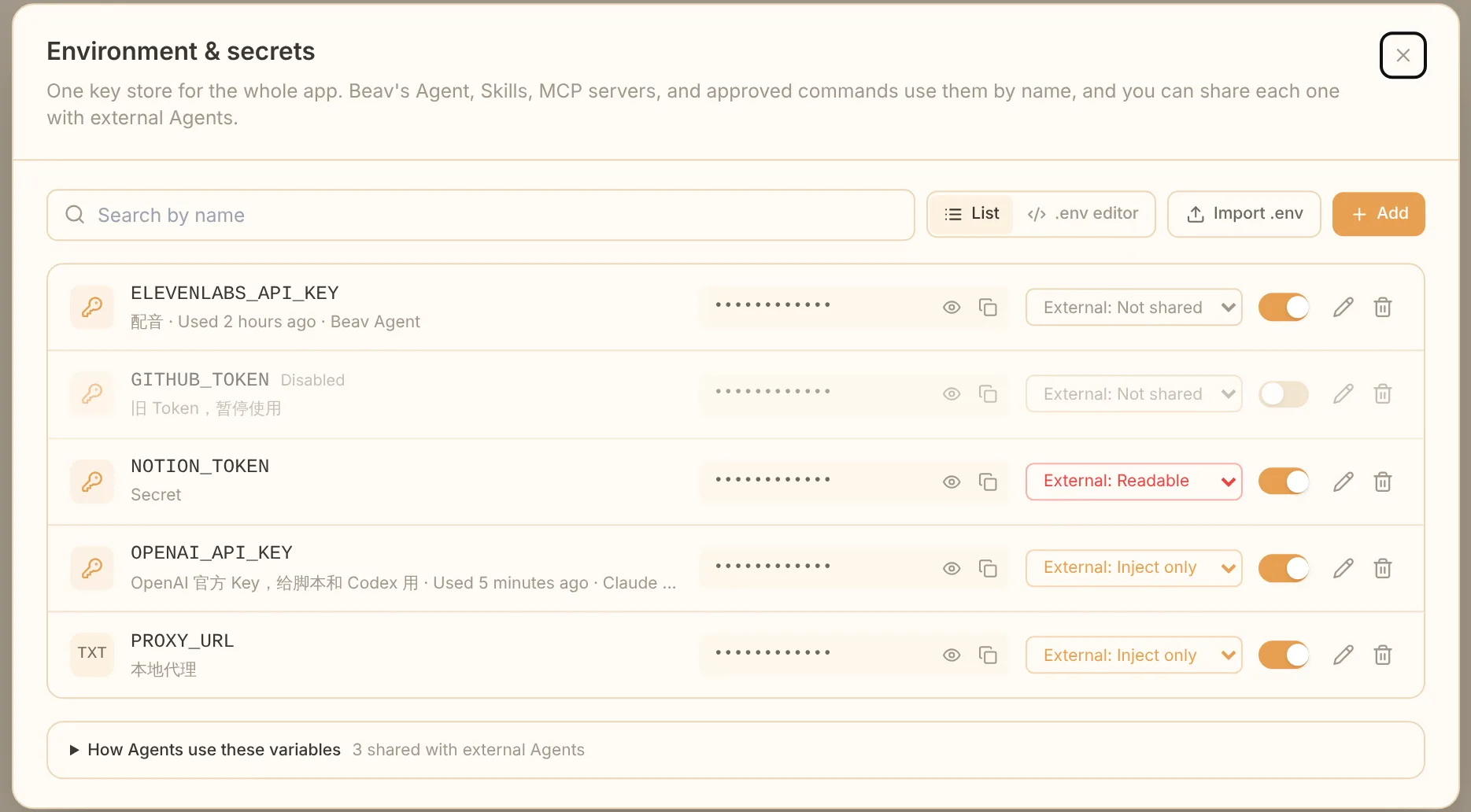
Open and manage
Click your avatar in the bottom-left corner and choose Environment & secrets from the account menu. MCP connection settings have the same entry.
- Secrets are stored in the system keychain and suit tokens, keys, and passwords. Plain values are saved in app settings and suit non-sensitive settings such as API URLs.
- Click a variable's name or the pencil icon to edit its name, type, value, note, and external access in place. Leave the value blank to keep it.
- Each row shows when the variable was last used and by whom (Beav Agent or the external tool's name).
- A disabled variable is unavailable to every Agent but is not deleted.
Edit as .env
Switch to .env editor to see every variable as one .env text:
# OpenAI key
OPENAI_API_KEY=••••••••

# Local proxy
PROXY_URL=http://127.0.0.1:7890- Secrets show as
••••••••. Leave it to keep the stored value, or replace it with a new value. - A
#comment directly above a variable becomes its note. - Deleting a line deletes the variable. Beav lists what will be deleted and asks before saving.
- New variables are saved as secrets.
To merge a .env without deleting anything, use Import .env.
How Beav's Agent uses them
Beav's built-in Agent can use every enabled variable but only sees names: Beav injects the values when it runs commands, scripts, Skills, or MCP servers, and masks them in output. See reusable scripts for how scripts declare them.
How external Agents use them
Agents connected through Beav MCP (Claude, Codex and WorkBuddy) see no variables by default. Choose an access level on each variable:
| Level | What an external Agent can do |
|---|---|
| Not shared (default) | It can't see the variable |
| Inject only | Use it in commands it runs with secrets_run; the value shows as [REDACTED] in results and is never returned |
| Readable | Also fetch the plain value with secrets_read |
An external Agent first calls secrets_list to see the shared names, notes, and levels (no values), then runs a command with secrets_run, for example:
curl -H "Authorization: Bearer $OPENAI_API_KEY" https://api.openai.com/v1/modelssecrets_run runs on your computer inside the Beav MCP process that the external tool started, so the tool's own approvals and sandbox still apply. It times out after 120 seconds by default, 600 at most. The connection needs an authorized plugin credential.
Safety
- Prefer Inject only: keys stay out of transcripts and logs.
- An Agent that can run commands could still deliberately transform and print a value, so only share with tools you trust.
- Turn on Readable only when a value must be written somewhere else.
- Don't paste keys into any Agent's chat. If a variable is missing, add it in Beav and tell the Agent its name.