
Localising ideas from YouTube
Tutorials, reviews and vlogs abroad are often half a step ahead. Save, transcribe, decompose the structure, then use AI rewrite to remake it for your own audience.
Collect
A good idea from YouTube is worth keeping. The video, title, description and thumbnail are saved to a library on your computer and transcribed, ready to take apart and remake in your own words.
Desktop app for macOS, Windows and Linux
Tutorials, reviews and vlogs abroad are often half a step ahead. Save, transcribe, decompose the structure, then use AI rewrite to remake it for your own audience.
Shorts pages work too. The shot script and clip MP4s go into the asset library for reference when you make vertical videos.
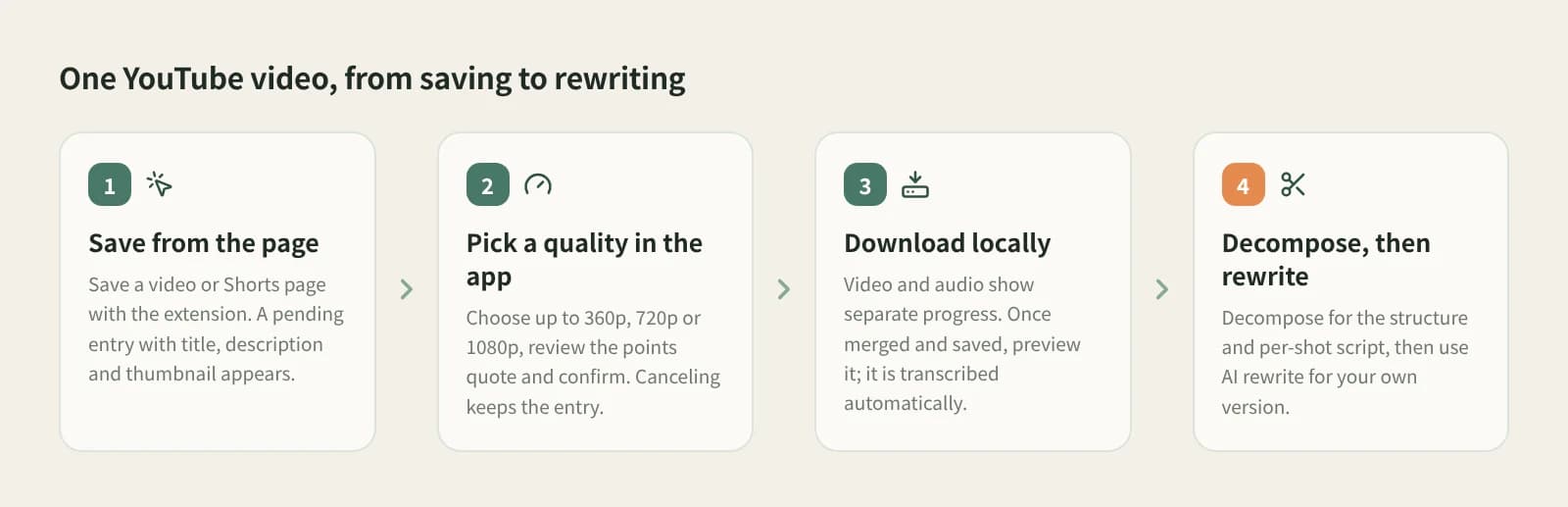
With the Beav desktop app and extension installed, open the video in desktop Chrome or Edge and save it with the extension. A pending entry appears in the knowledge base with the title, description and thumbnail. Away from your computer, Add link or Phone Upload create the same pending entry.
The dialog offers up to 360p (fastest), 720p (recommended) or 1080p (larger), with the credit price for this download as shown there. If the source is lower, you get the best quality under your cap. Cancel to keep the entry for later.
The card shows video and audio progress and speed, then merging and saving. Once on disk, the video can be previewed and is transcribed automatically.
Up to 1080p, in the knowledge base with title, description, thumbnail and source.
Text comes from local transcription, not platform captions.
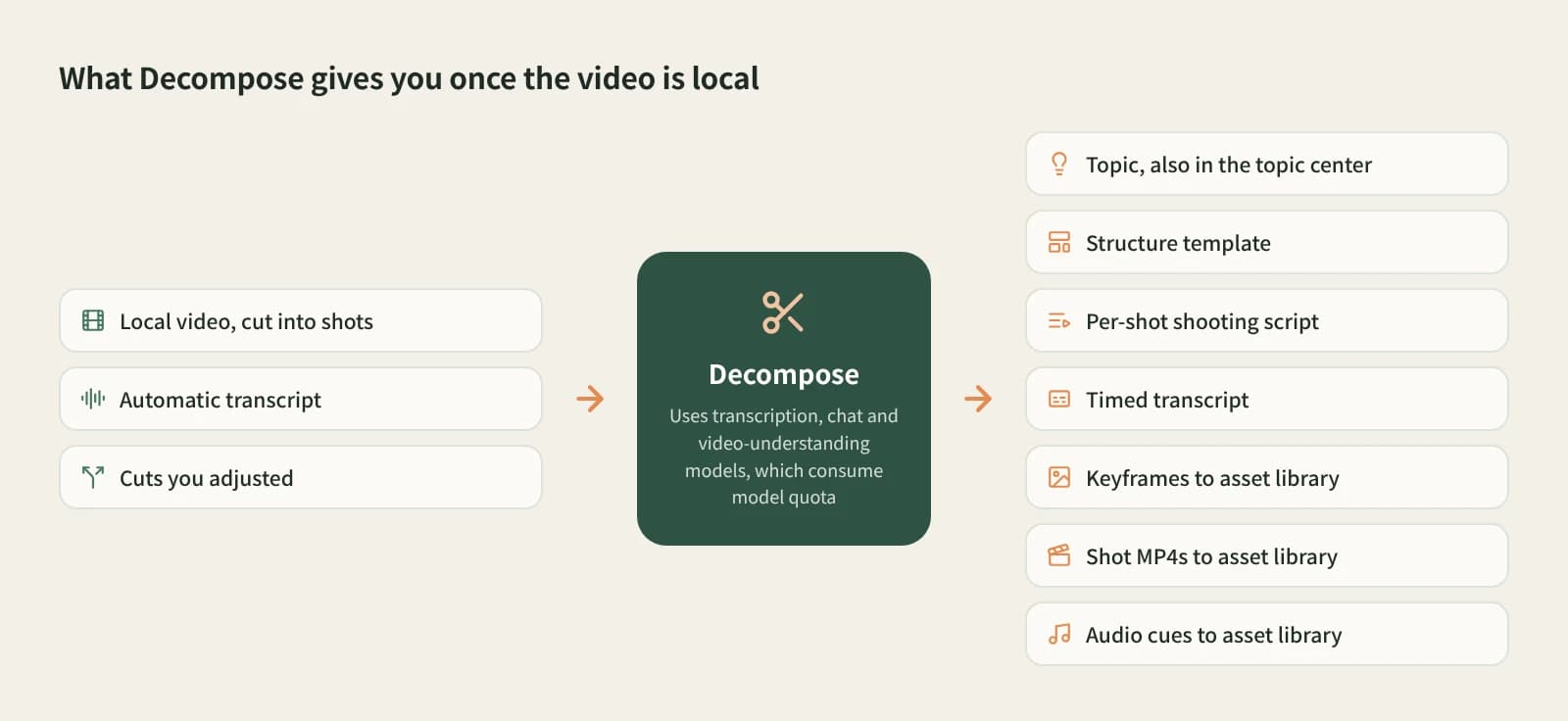
Decompose gives the topic, structure template, shot script and timestamped transcript; clips and keyframes go to the asset library.
AI rewrite takes the video into a new chat to learn its structure, not to copy it.
| Aspect | YouTube Premium offline | yt-dlp and similar | Asking an AI to summarise | Beav |
|---|---|---|---|---|
| What you get | An offline cache in the app | A video file | A summary or Q&A | Video, title, description, thumbnail and source |
| Quality and bulk | Per membership | Many options, playlists | No file | Up to 1080p, confirmed one by one |
| Text | Platform captions | Captions downloadable | Understands the content | Automatic local transcript |
| Shots | No | Cut them yourself | Usually text only | Shot script, clip MP4s and keyframes |
| Cost | Subscription | Mostly free | Their own rules | Credits per download; model quota for breakdown and rewrite |
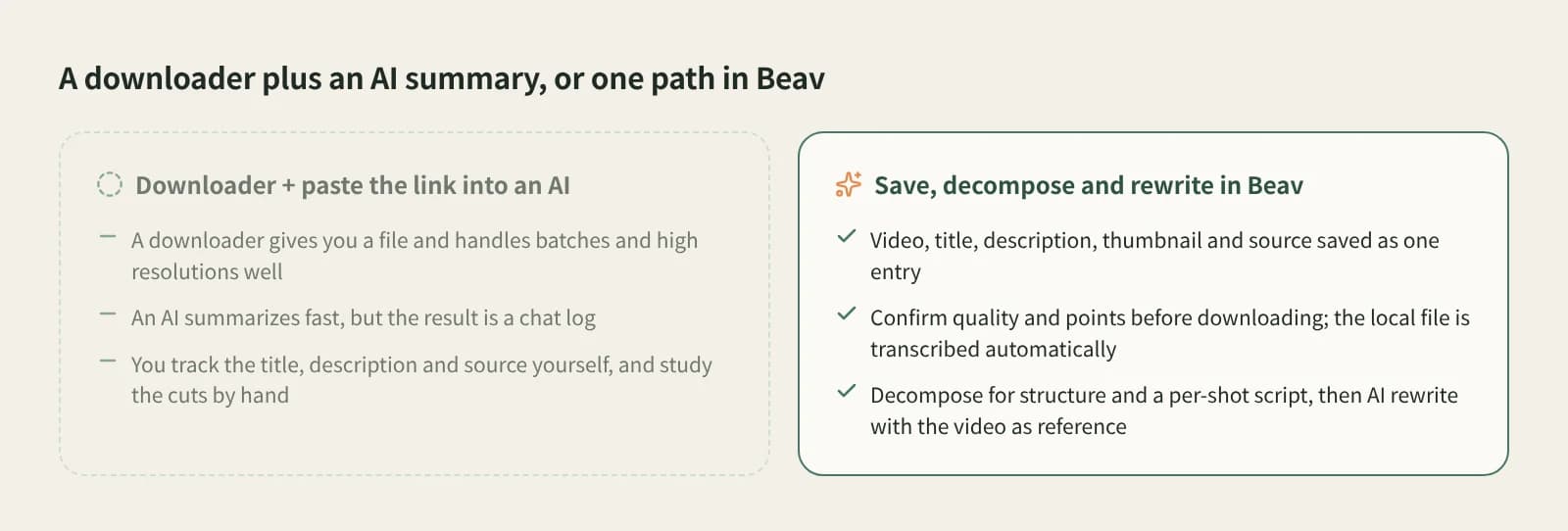
For offline viewing, YouTube Premium is easiest. For bulk or higher quality, yt-dlp and similar tools are more flexible and cheaper. To learn what a video says in a minute, ask an AI. Beav is for taking a video apart to make your own work, with the material and source kept in one library.
Open the video in your desktop browser, save it with the Beav extension, then pick a resolution and confirm the price in the app. The video downloads into your local knowledge base.
Up to 1080p; choose 360p, 720p or 1080p. If the source is lower, you get the best quality under your cap.
Each download costs the credits shown in the confirmation dialog. Credits are charged once the video is resolved and are not refunded if the download later fails; failed entries can be retried, with a new confirmation each time. Breakdown and rewriting use model quota.
No. Every download is confirmed in the app. For playlists or bulk downloads, tools like yt-dlp fit better.
The current flow does not read YouTube captions; text comes from automatic local transcription.
Yes. Save from the Shorts page the same way.
Only for your own study. Get the creator's permission before using it in your work, reposting or using it commercially.
Break down
Turn local videos, recordings and short-video links into transcripts or subtitles.
Break down
One-click breakdown: shot script, clips and timestamped transcript.
Create
Keep the original's structure, switch to your language and product.